

Payment Flow
Understand the customer-facing Stafiel payment flow.
The payment flow explains what customers see on the Stafiel payment page or widget and how they complete payment after a checkout session is created.
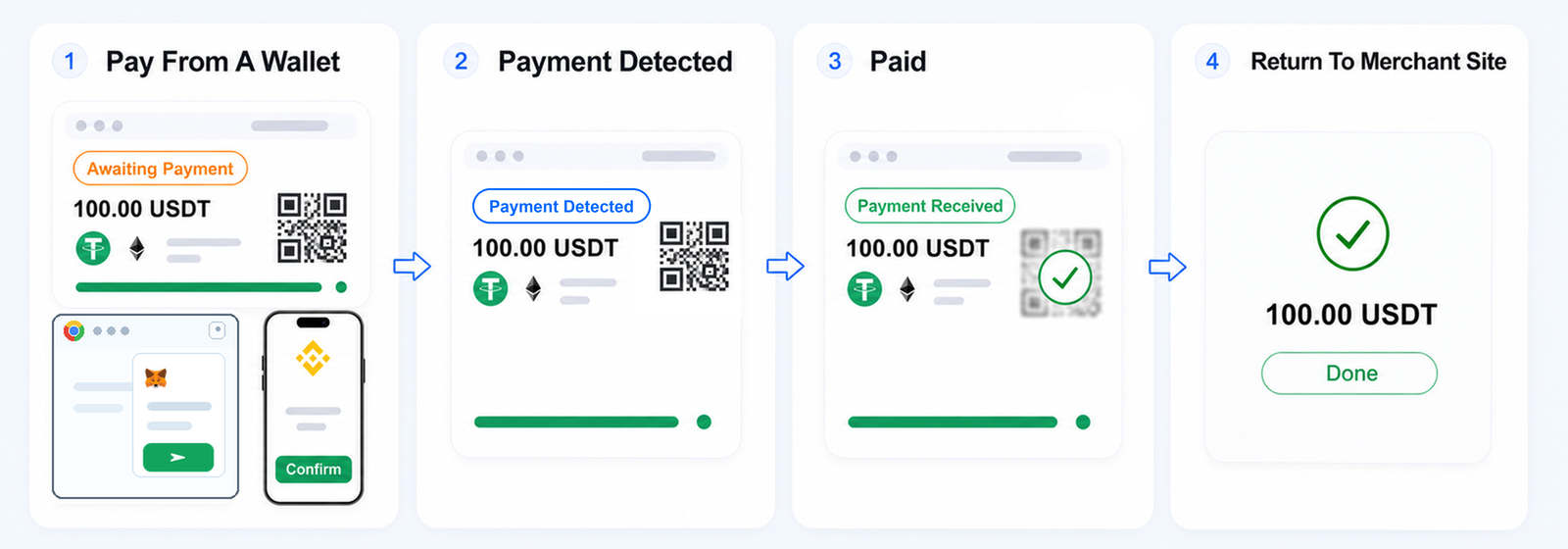
1. Pay From A Wallet
The customer sees a checkout waiting for payment:
- Awaiting Payment: the checkout is open and waiting for payment.
The customer can scan the QR code or copy the payment address into a mobile wallet, browser extension wallet, or centralized exchange.
Payment must use the selected USDT or USDC token, selected network, and payment address shown on the page or widget. A changed amount, different token, wrong network, or address from another checkout can create a payment exception and may result in lost funds.
Important: Customers should not send payment after the payment window expires. Late on-chain transfers are not credited to the order balance and do not enter the settlement flow.
For the supported token and network list, see Supported Assets and Networks. For exchange-related refund limitations, see Refund Basics and Payment and Refund Risks.
2. Payment Detected
Soon after payment is sent, the customer may see that payment activity has started:
- Payment Detected: Incoming payment activity appears. The final payment amount and order status are not confirmed yet. Some networks may skip this stage.
3. Payment Received
The customer sees the received payment result after the payment receives initial on-chain confirmation. Timing varies by network:
- Fullpaid: the received amount matches the requested amount.
- Overpaid: the received amount is above the requested amount; the extra amount can be reviewed for refund once the after-sales window opens, when refunds are available on the selected network.
- Underpaid: the received amount is below the requested amount; the customer can send an additional payment to the same address during the payment window.
Note: For Overpaid or Underpaid orders, the merchant decides the next step: fulfill, hold, review refund availability for the extra amount, request the missing amount during the payment window, or follow up with the customer.
4. Payment Confirmed
This stage means the payment has reached the required block confirmation count. Customers do not need to go through this stage directly. It runs in the background and can be viewed in order details in the Merchant Dashboard.
Payment Completion Confidence
| Stage | Corresponding order status | Completion confidence | Customer impression |
|---|---|---|---|
| Pay From A Wallet | Awaiting Payment | Not recorded yet | The customer is sending or preparing to send payment. |
| Payment Detected | Awaiting Payment | Seen on-chain | The customer may see that payment activity has started. |
| Payment Received | Fullpaid, Overpaid, or Underpaid | Amount recorded on-chain | The customer sees that the payment has been received and recorded for the order. |
| Payment Confirmed | Fullpaid, Overpaid, or Underpaid | Confirmed for fulfillment review | This runs in the background and can be viewed in Merchant Dashboard order details. |
For lifecycle details, see Order Lifecycle and Payment Status.
5. Return To Merchant Site
When an allowed Return URL is available, the customer can select Back on hosted checkout to return to the merchant store, order page, invoice flow, or support path.
Payment status changes do not automatically redirect the customer. Returning to the merchant site also does not change or confirm the order status. Review the latest order state before fulfillment.
For Return URL format and policy rules, see Checkout Sessions API.