

Order Lifecycle and Payment Status
Understand the order lifecycle, payment statuses, and exceptions.
Order lifecycle shows each business stage of a checkout as it moves from an open payment request to an operational outcome.
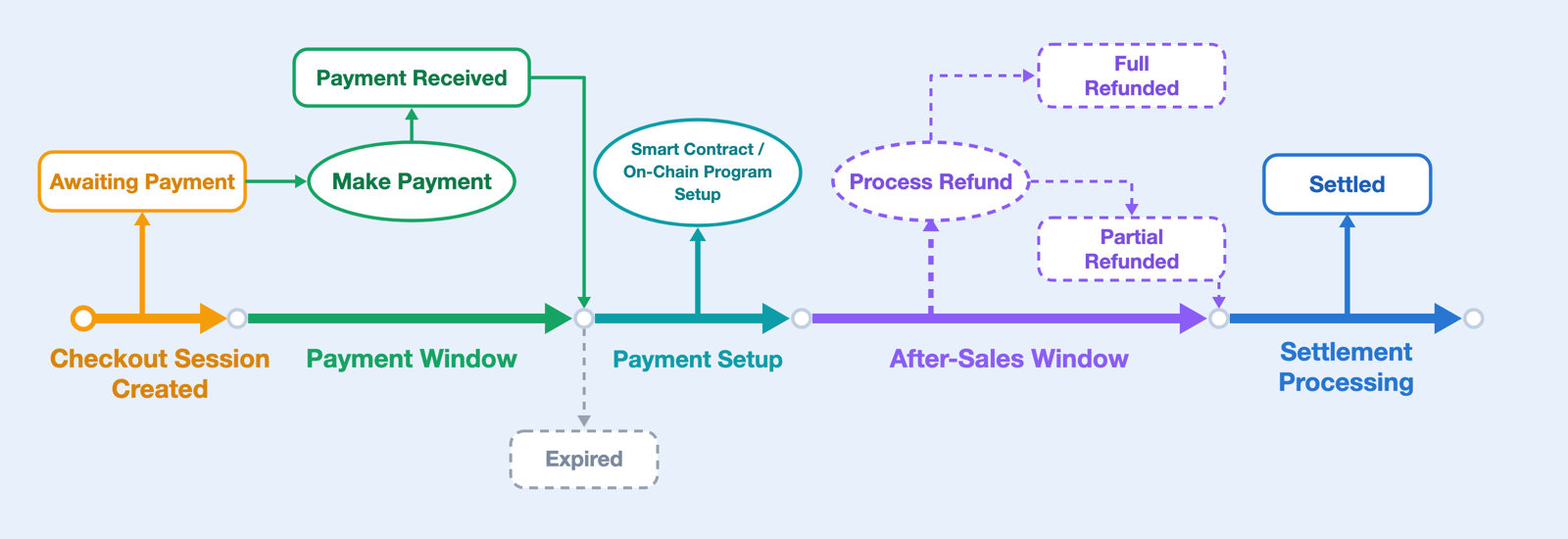
Order Lifecycle
Most orders follow this sequence from checkout creation to settlement:
- Checkout session created: the payment request is ready for the customer to open. This is the start point of the timeline. See Checkout Sessions.
- Payment window: the checkout waits for payment, and the payment page or widget displays payment progress. Payment activity during this window determines whether the order is Fullpaid, Underpaid, or Overpaid. If no payment is recorded before the window closes, the order can expire. See Payment Flow.
- Payment setup: the order's on-chain setup is completed through smart contract or on-chain program deployment, with required KYT/AML and related compliance checks. This process is automatic and requires no merchant action.
- After-sales window: this window starts when payment setup is complete. Refund handling can branch into Partial Refunded or Full Refunded. See Refund Basics.
- Settlement processing: eligible paid orders move through settlement after the configured after-sales window. Settlement records are available for review. See Settlement Basics.
Order Statuses
| Status | Business meaning |
|---|---|
| Awaiting Payment | The checkout is open and waiting for the customer to pay. |
| *Payment Detected | Incoming payment activity is detected before the final payment result. |
| Fullpaid | The recorded payment matches the expected amount. |
| Underpaid | The customer sent less than the expected amount. |
| Overpaid | The customer sent more than the expected amount. |
| *Payment Confirmed | The payment has reached the required network confirmation threshold. |
| Expired | The payment window closed while the order was still Awaiting Payment. |
| Settled | The order has a recorded settlement. |
| *Partial Refunded | A partial refund has been recorded for the order. |
| Full Refunded | A full refund has been recorded for the order. |
| Closed | The order is closed and no longer acts as an active payment request. |
| Compliance Hold | Risk, abuse, security, or compliance controls hold the order for review. |
Notes:
- Payment Detected shows that payment activity has started before the final payment result is known. It may appear on the payment page, widget, or webhook events.
- Payment Confirmed shows that the payment reached the required network confirmations. It appears in Merchant Dashboard order details or webhook events.
- Partial Refunded shows that part of the payment has been refunded. It appears in Merchant Dashboard order list and order details. When the full payment has been refunded, the order status becomes Full Refunded.
- This table is a status reference, not the order sequence. For the customer-facing payment flow, see Payment Flow.
Expired Orders Or Late Payments
An order expires when the payment window closes while it is still Awaiting Payment. Partial payments become Underpaid, not Expired. Do not present an expired checkout as payable.
If funds arrive late, review the order, payment records, and support context before deciding whether to fulfill, refund, or take further action. For payment-window guidance, see Payment Flow. For help with a late-payment case, contact Stafiel support.
Compliance Hold
An order enters Compliance Hold when KYT/AML, risk, abuse, security, or compliance review requires the order to be held. Do not treat a held order as ready for fulfillment, refund, or settlement until the hold is resolved.
Where To Observe Status
Order status is visible through the Merchant Dashboard, webhook events, or other payment notifications.
For technical order fields, see Orders API. For notification delivery, see Webhooks and Events.